Python API
This document contains a listing of all python APIs available in this package, with their respective documentation.
Base Modules
Base classes for defining fitters, digestable objects and how to train them
-
bob.ip.fingerfit.base.bb_from_landmarks(lms)[source]¶ Calculates the limiting bounding box from the landmarks
The bounding-box is minimum (area) rectangular shaped container in which all landmarks are still inside.
Parameters: lms (numpy.ndarray) – A 2D array of dtype float64that contains the landmarks for which to calculate the bounding-boxReturns: A 2-tuple in the format (y,x) indicating the top-left of the image in which the bounding box starts (lower absolute values) tuple: A 2-tuple in the format (y,x) indicating the bottom-right of the image in which the bounding box ends (higher absolute values)
Return type: tuple
-
class
bob.ip.fingerfit.base.Sample(stem, db, gt=None, ext='.png')[source]¶ Bases:
objectAn image, possibly with annotated landmarks
Parameters: - stem (str) – A stem defining the path (without extension) to the image
- db (str) – The root path for the database where the image comes from. To
find the image, this object will suffix the
stemto thedbpath and then append the extension to load the image. - gt (
str, Optional) – The root path for the annotations. An annotation file should be found at the same relative location as the image, but taking the pathgtas a base directory. Annotations are text files with with a preset annotation order (you must know), containing 1 key point in the format(y,x)per line. If this value is not specified, annotations are assumed to live along side the image sample (i.e.,gt=db). - ext (
str, Optional) – The extension of the image file to load. If not set, then we assume the input images are of type PNG (extension =.png)
-
image_path¶ Returns the sample path
-
groundtruth_path¶ Returns the sample path
-
image¶ Loads the image
Returns: A 2D array with dtype float64that contains the image in which the rows and columns match the array organization.Return type: numpy.ndarray
-
groundtruth¶ Loads the ground truth for this image, if there is any, raises otherwise
Returns: A 2D array with dtype float64that contains the ground-truth annotations for the current sample, one per row, each row in the format(y,x).Return type: numpy.ndarray Raises: IOError– in case the ground-truth for this sample is not available.
-
boundingbox(padding=0)[source]¶ Loads the object bounding box based on its ground-truth annotations
Parameters: padding (float) – If set, determines the additional padding in percentage from the bounding box to set. The returned bounding box is always constrained to the total image size Raises: IOError– in case the ground-truth for this sample is not available.
-
view_image(ax)[source]¶ Displays the image
Parameters: ax (matplotlib.axes.Axes) – The matplotlib Axes in which the figure will be created
-
view_groundtruth(ax, padding=0)[source]¶ Displays the groundtruth for this image
Information inprinted consists of the annotations and bounding-box
Parameters: - ax (matplotlib.axes.Axes) – The matplotlib Axes in which the figure will be created
- padding (float) – If set, determines the additional padding in percentage from the bounding box to set. The returned bounding box is always constrained to the total image size
Raises: IOError– in case the ground-truth for this sample is not available.
-
class
bob.ip.fingerfit.base.Result(sample, evolution=None)[source]¶ Bases:
objectObjects generated by a fitter, after the fitting process, containing the fitting result.
Parameters: - sample (numpy.ndarray) – A
Sampleobject - evolution (
numpy.ndarray, Optional) – A 3D array with all states of the fitting iteration showing how the fitted points evolved from the initial estimate (first entry) through the iterations, until the last estimate (last entry)
-
landmarks
-
save(path)[source]¶ Saves the result contents to disk using the path
This procedure will record in an HDF5 file, respecting the original sample path, the result of the fitting procedure. The HDF5 file will be organized as this:
GROUP "/" {
   DATASET "landmarks" {
      DATATYPE  H5T_IEEE_F64LE
      DATASPACE  SIMPLE { ( P, 2 ) / ( P, 2 ) }
      ATTRIBUTE "evolution" {
         DATATYPE  H5T_IEEE_F64LE
         DATASPACE  SIMPLE { ( N-1, P, 2 ) / ( N-1, P, 2 ) }
      }
   }
}
}
Where
Ncorresponds to the number of iterations that it took for the fitting procedure to get to the current results andPthe number of points there were fitted.Parameters: path (str) – The path where to save the fitted shape Raises: AssertionError– in case self.sample was not set. This method needs the original sample that knows the stem to the original dataset file.
-
load(path)[source]¶ Loads the result contents from the disk using the path
This procedure loads annotations in the format described at
save()and restores the current object state.Parameters: path (str) – The path where to load the fitted shape from Raises: AssertionError– in case self.sample was not set. This method needs the original sample that knows the stem to the original dataset file.
-
view_initial(ax, padding)[source]¶ Displays the initial conditions
Parameters: - ax (matplotlib.axes.Axes) – The matplotlib Axes in which the figure will be created
- padding (float) – If set, determines the additional padding in percentage from the bounding box to set. The returned bounding box is always constrained to the total image size
-
view_fitting(ax)[source]¶ Displays the fitting result using matplotlib
Parameters: ax (matplotlib.axes.Axes) – The matplotlib Axes in which the figure will be created
-
debug_view(fig, padding)[source]¶ Displays a debugging view of the fitting process
Parameters: fig (matplotlib.figure.Figure) – the matplotlib figure in which the debugging information will be printed. The output consists of various subplots, containing:
- The ground truth
- The initial conditions
- The fitting process (overlapped with the ground truth)
-
avg_l2_error()[source]¶ Returns the average euclidean distance w.r.t. the ground-truth
Returns: The average eucliean distance for all landmarks
Return type: Raises: IOError– If ground-truth cannot be found with the associated sample. To- check for the ground-truth existence, use
self.sample.has_groundtruth().
-
jaccard_index()[source]¶ Calculates the intersection between the fitted mask and ground-truth
This function is a wrapper to
mask.jaccard_index().Returns: as described by
mask.jaccard_index().Return type: Raises: IOError– If ground-truth cannot be found with the associated sample. To- check for the ground-truth existence, use
self.sample.has_groundtruth().
- sample (numpy.ndarray) – A
-
class
bob.ip.fingerfit.base.Fitter[source]¶ Bases:
objectBase class for training and fitting fingervein images
-
train(samples)[source]¶ Trains a new fitter based on input samples.
Parameters: samples (list of Sample) – A list or iterable over samples that will be used to train this fitter.
-
Menpofit Implementations
Fitting using Menpo
-
bob.ip.fingerfit.menpofitter.pointcloud_to_trimesh(p)[source]¶ Transforms the input point cloud annotations into a specific trimesh
-
class
bob.ip.fingerfit.menpofitter.AAMFitter(locality='holistic', features='igo', scales=(0.5, 1.0), padding=0.0, diagonal=None)[source]¶ Bases:
bob.ip.fingerfit.base.FitterFitting using Active Appearance Models from
menpoParameters: - locality (str) – Either
holisticorpatch - features (str) – Either
igo,hog,lbpordsift - scales (list of
float) – A list of floating point numbers indicating the scales for the fitting model. This list normally ends with the full image scale, i.e., 1.0 and must be setup in ascending order. Smaller values indicate a downscaled version of the original image. - padding (float) – If set, determines the additional padding in percentage from the bounding box to set. The returned bounding box is always constrained to the total image size, even with an excess padding (i.e., a value bigger than 0.0). This value is both used for training and fitting.
- diagonal (int) – Maximum diagonal size used during training. If set, then images from the training set that surpass this diagonal size will be rescaled so their diagonal is exactly the given value. Furthermore, the model reference shape diagonal is also reset to this size.
-
SUPPORTED_FEATURES= {'lbp': <function lbp>, 'dsift': functools.partial(<function dsift>, fast=True, cell_size_horizontal=5, num_bins_vertical=1, cell_size_vertical=5, num_bins_horizontal=1, num_or_bins=8), 'igo': <function igo>, 'hog': <function hog>}
- locality (str) – Either
Performance Figures
Utilities for preprocessing vein imagery
-
bob.ip.fingerfit.mask.assert_points(area, points)[source]¶ Checks all points fall within the determined shape region, inclusively
This assertion function, test all points given in
pointsfall within a certain area provided inarea.Parameters: - area (tuple) – A tuple containing the size of the limiting area where the points should all be in.
- points (numpy.ndarray) – A 2D numpy ndarray with any number of rows (points)
and 2 columns (representing
yandxcoordinates respectively), or any type convertible to this format. This array contains the points that will be checked for conformity. In case one of the points doesn’t fall into the determined area an assertion is raised.
Raises: AssertionError– In case one of the input points does not fall within the area defined.
-
bob.ip.fingerfit.mask.fix_points(area, points)[source]¶ Checks/fixes all points so they fall within the determined shape region
Points which are lying outside the determined area will be brought into the area by moving the offending coordinate to the border of the said area.
Parameters: - area (tuple) – A tuple containing the size of the limiting area where the points should all be in.
- points (numpy.ndarray) – A 2D
numpy.ndarraywith any number of rows (points) and 2 columns (representingyandxcoordinates respectively), or any type convertible to this format. This array contains the points that will be checked/fixed for conformity. In case one of the points doesn’t fall into the determined area, it is silently corrected so it does.
Returns: A new array of points with corrected coordinates
Return type:
-
bob.ip.fingerfit.mask.poly_to_mask(shape, points)[source]¶ Generates a binary mask from a set of 2D points
Parameters: - shape (tuple) – A tuple containing the size of the output mask in height and
width, for Bob compatibility
(y, x). - points (list) – A list of tuples containing the polygon points that form a
region on the target mask. A line connecting these points will be drawn
and all the points in the mask that fall on or within the polygon line,
will be set to
True. All other points will have a value ofFalse.
Returns: A 2D numpy ndarray with
dtype=boolwith the mask generated with the determined shape, using the points for the polygon.Return type: - shape (tuple) – A tuple containing the size of the output mask in height and
width, for Bob compatibility
-
bob.ip.fingerfit.mask.mask_to_image(mask, dtype=<class 'numpy.uint8'>)[source]¶ Converts a binary (boolean) mask into an integer or floating-point image
This function converts a boolean binary mask into an image of the desired type by setting the points where
Falseis set to 0 and points whereTrueis set to the most adequate value taking into consideration the destination data typedtype. Here are support types and their ranges:- numpy.uint8:
[0, (2^8)-1] - numpy.uint16:
[0, (2^16)-1] - numpy.uint32:
[0, (2^32)-1] - numpy.uint64:
[0, (2^64)-1] - numpy.float32:
[0, 1.0](fixed) - numpy.float64:
[0, 1.0](fixed) - numpy.float128:
[0, 1.0](fixed)
All other types are currently unsupported.
Parameters: - mask (numpy.ndarray) – A 2D numpy ndarray with boolean data type, containing the mask that will be converted into an image.
- dtype (numpy.dtype) – A valid numpy data-type from the list above for the resulting image
Returns: With the designated data type, containing the binary image formed from the mask.
Return type: Raises: TypeError– If the type is not supported by this function- numpy.uint8:
-
bob.ip.fingerfit.mask.show_image(image)[source]¶ Shows a single image using
PIL.Image.Image.show()Warning
This function opens a new window. You must be operating interactively in a windowing system for it to work properly.
Parameters: image (numpy.ndarray) – A 2D numpy.ndarray compose of 8-bit unsigned integers containing the original image
-
bob.ip.fingerfit.mask.draw_mask_over_image(image, mask, color='red')[source]¶ Plots the mask over the image of a finger, for debugging purposes
Parameters: - image (numpy.ndarray) – A 2D numpy.ndarray compose of 8-bit unsigned integers containing the original image
- mask (numpy.ndarray) – A 2D numpy.ndarray compose of boolean values containing the calculated mask
Returns: An image in PIL format
Return type:
-
bob.ip.fingerfit.mask.show_mask_over_image(image, mask, color='red')[source]¶ Plots the mask over the image of a finger using
PIL.Image.Image.show()Warning
This function opens a new window. You must be operating interactively in a windowing system for it to work properly.
Parameters: - image (numpy.ndarray) – A 2D numpy.ndarray compose of 8-bit unsigned integers containing the original image
- mask (numpy.ndarray) – A 2D numpy.ndarray compose of boolean values containing the calculated mask
-
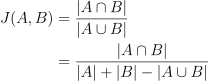
bob.ip.fingerfit.mask.jaccard_index(a, b)[source]¶ Calculates the intersection over union for two masks
This function calculates the Jaccard index:
Parameters: - a (numpy.ndarray) – A 2D numpy array with dtype
bool - b (numpy.ndarray) – A 2D numpy array with dtype
bool
Returns: The floating point number that corresponds to the Jaccard index. The float value lies inside the interval
![[0, 1]](_images/math/02b99e25ae92d555c285768eb92a199abd3cf9e2.svg) . If
. If aandbare equal, then the similarity is maximum and the value output is1.0. If the areas are exclusive, then the value output by this function is0.0.Return type: - a (numpy.ndarray) – A 2D numpy array with dtype
-
bob.ip.fingerfit.mask.intersect_ratio(a, b)[source]¶ Calculates the intersection ratio between the ground-truth and a probe
This function calculates the intersection ratio between a ground-truth mask (
 ; probably generated from an annotation) and a probe mask
(
; probably generated from an annotation) and a probe mask
( ), returning the ratio of overlap when the probe is compared to the
ground-truth data:
), returning the ratio of overlap when the probe is compared to the
ground-truth data: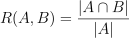
So, if the probe occupies the entirety of the ground-truth data, then the output of this function is
1.0, otherwise, if areas are exclusive, then this function returns0.0. The output of this function should be analyzed against the output ofintersect_ratio_of_complement(), which provides the complementary information about the intersection of the areas being analyzed.Parameters: - a (numpy.ndarray) – A 2D numpy array with dtype
bool, that corresponds to the ground-truth object - b (numpy.ndarray) – A 2D numpy array with dtype
bool, that corresponds to the probe object that will be compared to the ground-truth
Returns: The floating point number that corresponds to the overlap ratio. The float value lies inside the interval
.Return type: - a (numpy.ndarray) – A 2D numpy array with dtype
-
bob.ip.fingerfit.mask.intersect_ratio_of_complement(a, b)[source]¶ Calculates the intersection ratio between the complement of ground-truth and a probe
This function calculates the intersection ratio between the complement of a ground-truth mask (
; probably generated from an annotation) and a
probe mask (), returning the ratio of overlap when the probe is
compared to the ground-truth data:
So, if the probe is totally inside the ground-truth data, then the output of this function is
0.0, otherwise, if areas are exclusive for example, then this function outputs greater than zero. The output of this function should be analyzed against the output ofintersect_ratio(), which provides the complementary information about the intersection of the areas being analyzed.Parameters: - a (numpy.ndarray) – A 2D numpy array with dtype
bool, that corresponds to the ground-truth object - b (numpy.ndarray) – A 2D numpy array with dtype
bool, that corresponds to the probe object that will be compared to the ground-truth
Returns: The floating point number that corresponds to the overlap ratio between the probe area and the complement of the ground-truth area. There are no bounds for the float value on the right side:
 .
.Return type: - a (numpy.ndarray) – A 2D numpy array with dtype
General Utilities
Utilities that are shared among various fitters
-
bob.ip.fingerfit.utils.mean_image(samples)[source]¶ Evaluates the mean image and shape from provided samples
Parameters: samples (list of base.Sample) – A list or iterable over samples that will be used to train this fitter.Returns: 2D array with dtype float64containing the mean imagenumpy.ndarray: 2D array with dtype
float64containing the average value for each landmark in the provided samples. Each row represents the points in the same order of the annotations in the format(y,x)numpy.ndarray: 2D array with dtype
float64containing the (biased) estimated standard deviation for each landmark in the provided samples. Each row represents the points in the same order of the annotations in the format(y,x)int: The total number of files loaded
Return type: numpy.ndarray Raises: AssertionError– if input does not contain enough images (>0) or landmarks
-
bob.ip.fingerfit.utils.view_image(image, landmarks, std=None, title=None)[source]¶ Views image and annotations using matplotlib
This function will call matplotlib and return a figure object you can
show(), displaying the input image and relevant annotations.Parameters: - image (numpy.ndarray) – A numpy 2D array (float64) with the mean image organized in Bob-style (y, x)
- landmarks (numpy.ndarray) – 2D array with dtype
float64containing the landmarks to graph with the provided sample. Each row represents the points in the same order of the annotations in the format(y,x) - std (numpy.ndarray) – 2D array with dtype
float64containing the dimensions in(y,x)that will define an ellipse to be drawn at the resulting image. This is normally used to depict standard deviation on mean annotations. - title (
str, Optional) – The title for the generated figure
Returns: A pregenerated figure showing the input image and annotations.
Return type:
-
bob.ip.fingerfit.utils.view_mean_image(samples)[source]¶ View mean image and mean annotations from a sample set
Parameters: samples (list of base.Sample) – A list or iterable over samples that will be used to train this fitter.Returns: A pregenerated figure showing the input result and associated annotations. Return type: matplotlib.figure.Figure
-
bob.ip.fingerfit.utils.generate_samples_from_list(images, annotations=None)[source]¶ Generates samples from a list of image files
Recursively looks for images with the provided extension on the
databasedirectory. Returns a list ofbase.Sampleobjects.This function also supports being called from inside an SGE grid array job. In this case, it will automatically calculate which subset of the total number of samples it requires to yield and only return those.
Parameters: Returns: objects
Return type: generator of
base.Sample
-
bob.ip.fingerfit.utils.generate_samples(database, annotations=None, ext='.png')[source]¶ Recursively finds samples in directories
Recursively looks for images with the provided extension on the
databasedirectory. Yields a list ofbase.Sampleobjects.This function also supports being called from inside an SGE grid array job. In this case, it will automatically calculate which subset of the total number of samples it requires to yield and only return those.
Parameters: Returns: objects
Return type: generator of
base.Sample
-
bob.ip.fingerfit.utils.generate_results_with_annotations(database, annotations, results, ext='.png')[source]¶ Recursively finds samples, annotations and results in directories
Recursively looks for images with the provided extension on the
databasedirectory that contain similarly named annotations on theannotationsdirectory and results in theresultsdirectory. Yields a list ofbase.Resultobjects.Parameters: Returns: result objects
Return type: list of
base.Result
Command-line Parsing and Validation
Utilities for command-line option validation
-
bob.ip.fingerfit.validate.setup_logger(name, level)[source]¶ Sets up and checks a verbosity level respects min and max boundaries
Parameters: Returns: A standard Python logger that can be used to log messages
Return type: Raises: schema.SchemaError– If the verbosity level exceeds the maximum allowed of 4
-
bob.ip.fingerfit.validate.make_dir(p)[source]¶ Checks if a path exists, if it doesn’t, creates it
Parameters: p (str) – The path to check Returns
bool:True, always
-
bob.ip.fingerfit.validate.check_path_does_not_exist(p)[source]¶ Checks if a path exists, if it does, raises an exception
Parameters: p (str) – The path to check Returns: True, alwaysReturn type: bool Raises: schema.SchemaError– if the path exists
-
bob.ip.fingerfit.validate.check_path_exists(p)[source]¶ Checks if a path exists, if it doesn’t, raises an exception
Parameters: p (str) – The path to check Returns: True, alwaysReturn type: bool Raises: schema.SchemaError– if the path doesn’t exist
-
bob.ip.fingerfit.validate.check_model_does_not_exist(p)[source]¶ Checks if the path to any potential model file does not exist
Parameters: p (str) – The path to check Returns: True, alwaysReturn type: bool Raises: schema.SchemaError– if the path exists
-
bob.ip.fingerfit.validate.check_iterations(l)[source]¶ Checks if the number of iterations are all equal to or above 0
Parameters: l (list) – A list of strwith the number of iterations per scale to use for fitting.Returns: Of intwith the checked number of iterations per scaleReturn type: list Raises: schema.SchemaError– if any of the number of iterations per scale is negative
-
bob.ip.fingerfit.validate.load_model(p)[source]¶ Loads the menpofit model from a pickle file indicated on
pParameters: p (str) – The path to load the menpofit model from Returns: The menpofit model Return type: menpofitter.AAMFitter Raises: schema.SchemaError– if the path doesn’t exist
-
bob.ip.fingerfit.validate.check_scales(l)[source]¶ Checks if the values of scales is consistent
Parameters: Returns: Of
floatwith the checked number of scalesReturn type: Raises: schema.SchemaError– in these cases:- The total number of scales is zero
- The scales are not in ascending order
-
bob.ip.fingerfit.validate.open_multipage_pdf_file(s)[source]¶ Returns an opened matplotlib multi-page file
Parameters: p (str) – The path to the file to open Returns: with the handle to the multipage PDF file Return type: matplotlib.backends.backend_pdf.PdfPages Raises: schema.SchemaError– if the path exists