Python API
This section lists all the functionality available in this library allowing to run face PAD experiments.
Database Interfaces
REPLAY-ATTACK Database
-
class
bob.pad.face.database.replay.ReplayPadFile(f)[source]¶ Bases:
bob.pad.base.database.PadFileA high level implementation of the File class for the REPLAY-ATTACK database.
-
load(directory=None, extension='.mov')[source]¶ Overridden version of the load method defined in the
PadFile.Parameters:
directory:str- String containing the path to the Replay database.
extension:str- Extension of the video files in the Replay database.
Returns:
video_data: FrameContainer- Video data stored in the FrameContainer, see
bob.bio.video.utils.FrameContainerfor further details.
-
-
class
bob.pad.face.database.replay.ReplayPadDatabase(protocol='grandtest', original_directory=None, original_extension=None, **kwargs)¶ Bases:
bob.pad.base.database.PadDatabaseA high level implementation of the Database class for the REPLAY-ATTACK database.
-
annotations(f)[source]¶ Return annotations for a given file object
f, which is an instance ofReplayPadFiledefined in the HLDI of the Replay-Attack DB. Theload()method ofReplayPadFileclass (see above) returns a video, therefore this method returns bounding-box annotations for each video frame. The annotations are returned as dictionary of dictionaries.Parameters:
f:object- An instance of
ReplayPadFiledefined above.
Returns:
annotations:dict- A dictionary containing the annotations for each frame in the video.
Dictionary structure:
annotations = {'1': frame1_dict, '2': frame1_dict, ...}. WhereframeN_dict = {'topleft': (row, col), 'bottomright': (row, col)}is the dictionary defining the coordinates of the face bounding box in frame N.
-
objects(groups=None, protocol=None, purposes=None, model_ids=None, **kwargs)[source]¶ This function returns lists of ReplayPadFile objects, which fulfill the given restrictions.
Keyword parameters:
groups:str- OR a list of strings. The groups of which the clients should be returned. Usually, groups are one or more elements of (‘train’, ‘dev’, ‘eval’)
protocol:str- The protocol for which the clients should be retrieved. The protocol is dependent on your database. If you do not have protocols defined, just ignore this field.
purposes:str- OR a list of strings. The purposes for which File objects should be retrieved. Usually it is either ‘real’ or ‘attack’.
model_ids- This parameter is not supported in PAD databases yet
Returns:
files: [ReplayPadFile]- A list of ReplayPadFile objects.
-
REPLAY-MOBILE Database
-
class
bob.pad.face.database.replay_mobile.ReplayMobilePadFile(f)[source]¶ Bases:
bob.pad.base.database.PadFileA high level implementation of the File class for the Replay-Mobile database.
-
convert_arr_to_frame_cont(data)[source]¶ This function converts an input 4D array with frames into FrameContainer, where each frame is an RGB image. The dimensionality of the input array is [N_frames, 3, N_rows, N_cols].
Parameters:
data: 4Dnumpy.ndarray- An input 4D array with frames of the dimensionality: [N_frames, 3, N_rows, N_cols].
Returns:
frames: FrameContainer- Resulting FrameContainer containing RGB frames.
-
load(directory=None, extension='.mov')[source]¶ Overridden version of the load method defined in the
PadFile.Parameters:
directory:str- String containing the path to the Replay-Mobile database.
extension:str- Extension of the video files in the Replay-Mobile database.
Returns:
video_data: FrameContainer- Video data stored in the FrameContainer, see
bob.bio.video.utils.FrameContainerfor further details.
-
-
class
bob.pad.face.database.replay_mobile.ReplayMobilePadDatabase(protocol='grandtest', original_directory=None, original_extension=None, **kwargs)¶ Bases:
bob.pad.base.database.PadDatabaseA high level implementation of the Database class for the Replay-Mobile database.
-
annotations(f)[source]¶ Return annotations for a given file object
f, which is an instance ofReplayMobilePadFiledefined in the HLDI of the Replay-Mobile DB. Theload()method ofReplayMobilePadFileclass (see above) returns a video, therefore this method returns bounding-box annotations for each video frame. The annotations are returned as dictionary of dictionaries.Parameters:
f:object- An instance of
ReplayMobilePadFiledefined above.
Returns:
annotations:dict- A dictionary containing the annotations for each frame in the video.
Dictionary structure:
annotations = {'1': frame1_dict, '2': frame1_dict, ...}. WhereframeN_dict = {'topleft': (row, col), 'bottomright': (row, col)}is the dictionary defining the coordinates of the face bounding box in frame N.
-
objects(groups=None, protocol=None, purposes=None, model_ids=None, **kwargs)[source]¶ This function returns lists of ReplayMobilePadFile objects, which fulfill the given restrictions.
Keyword parameters:
groups:str- OR a list of strings. The groups of which the clients should be returned. Usually, groups are one or more elements of (‘train’, ‘dev’, ‘eval’)
protocol:str- The protocol for which the clients should be retrieved. The protocol is dependent on your database. If you do not have protocols defined, just ignore this field.
purposes:str- OR a list of strings. The purposes for which File objects should be retrieved. Usually it is either ‘real’ or ‘attack’.
model_ids- This parameter is not supported in PAD databases yet
Returns:
files: [ReplayMobilePadFile]- A list of ReplayMobilePadFile objects.
-
MSU MFSD Database
-
class
bob.pad.face.database.msu_mfsd.MsuMfsdPadFile(f)[source]¶ Bases:
bob.pad.base.database.PadFileA high level implementation of the File class for the MSU MFSD database.
-
convert_arr_to_frame_cont(data)[source]¶ This function converts an input 4D array with frames into FrameContainer, where each frame is an RGB image. The dimensionality of the input array is [N_frames, 3, N_rows, N_cols].
Parameters:
data: 4Dnumpy.ndarray- An input 4D array with frames of the dimensionality: [N_frames, 3, N_rows, N_cols].
Returns:
frames: FrameContainer- Resulting FrameContainer containing RGB frames.
-
load(directory=None, extension=None)[source]¶ Overridden version of the load method defined in the
PadFile.Parameters:
directory:str- String containing the path to the MSU MFSD database. Default: None
extension:str- Extension of the video files in the MSU MFSD database.
Note:
extensionvalue is not used in the code of this method. Default: None
Returns:
video_data: FrameContainer- Video data stored in the FrameContainer, see
bob.bio.video.utils.FrameContainerfor further details.
-
-
class
bob.pad.face.database.msu_mfsd.MsuMfsdPadDatabase(protocol='grandtest', original_directory=None, original_extension=None, **kwargs)¶ Bases:
bob.pad.base.database.PadDatabaseA high level implementation of the Database class for the MSU MFSD database.
-
annotations(f)[source]¶ Return annotations for a given file object
f, which is an instance ofMsuMfsdPadFiledefined in the HLDI of the MSU MFSD DB. Theload()method ofMsuMfsdPadFileclass (see above) returns a video, therefore this method returns bounding-box annotations for each video frame. The annotations are returned as dictionary of dictionaries.Parameters:
f:object- An instance of
MsuMfsdPadFiledefined above.
Returns:
annotations:dict- A dictionary containing the annotations for each frame in the video.
Dictionary structure:
annotations = {'1': frame1_dict, '2': frame1_dict, ...}. WhereframeN_dict = {'topleft': (row, col), 'bottomright': (row, col)}is the dictionary defining the coordinates of the face bounding box in frame N.
-
objects(groups=None, protocol=None, purposes=None, model_ids=None, **kwargs)[source]¶ This function returns lists of MsuMfsdPadFile objects, which fulfill the given restrictions.
Keyword parameters:
groups:str- OR a list of strings. The groups of which the clients should be returned. Usually, groups are one or more elements of (‘train’, ‘dev’, ‘eval’)
protocol:str- The protocol for which the clients should be retrieved.
Note: this argument is not used in the code, because
objectsmethod of the low-level BD interface of the MSU MFSD doesn’t haveprotocolargument. purposes:str- OR a list of strings. The purposes for which File objects should be retrieved. Usually it is either ‘real’ or ‘attack’.
model_ids- This parameter is not supported in PAD databases yet.
Returns:
files: [MsuMfsdPadFile]- A list of MsuMfsdPadFile objects.
-
Aggregated Database
-
class
bob.pad.face.database.aggregated_db.AggregatedDbPadFile(f)[source]¶ Bases:
bob.pad.base.database.PadFileA high level implementation of the File class for the Aggregated Database uniting 3 databases: REPLAY-ATTACK, REPLAY-MOBILE and MSU MFSD.
-
encode_file_id(f, n=2000)[source]¶ Return a modified version of the
f.idensuring uniqueness of the ids across all databases.Parameters:
f:object- An instance of the File class defined in the low level db interface of the Replay-Attack or Replay-Mobile or MSU MFSD database, respectively in the bob.db.replay.models.py file or in the bob.db.replaymobile.models.py file or in the bob.db.msu_mfsd_mod.models.py file.
n:int- An offset to be added to the file id for different databases is defined as follows: offset = k*n, where k is the database number, k = 0,1,2 in our case. Default: 2000.
Returns:
file_id:int- A modified version of the file id, which is now unigue accross all databases.
-
encode_file_path(f)[source]¶ Append the name of the database to the end of the file path separated with “_”.
Parameters:
f:object- An instance of the File class defined in the low level db interface of the Replay-Attack or Replay-Mobile or MSU MFSD database, respectively in the bob.db.replay.models.py file or in the bob.db.replaymobile.models.py file or in the bob.db.msu_mfsd_mod.models.py file.
Returns:
file_path:str- Modified path to the file, with database name appended to the end separated with “_”.
-
load(directory=None, extension='.mov')[source]¶ Overridden version of the load method defined in the
PadFile.Parameters:
directory:str- String containing the paths to all databases used in this aggregated database. The paths are separated with a space.
extension:str- Extension of the video files in the REPLAY-ATTACK and REPLAY-MOBILE databases. The extension of files in MSU MFSD is not taken into account in the HighLevel DB Interface of MSU MFSD. Default: ‘.mov’.
Returns:
video_data: FrameContainer- Video data stored in the FrameContainer, see
bob.bio.video.utils.FrameContainerfor further details.
-
-
class
bob.pad.face.database.aggregated_db.AggregatedDbPadDatabase(protocol='grandtest', original_directory=None, original_extension=None, **kwargs)¶ Bases:
bob.pad.base.database.PadDatabaseA high level implementation of the Database class for the Aggregated Database uniting 3 databases: REPLAY-ATTACK, REPLAY-MOBILE and MSU MFSD.
-
annotations(f)[source]¶ Return annotations for a given file object
f, which is an instance ofAggregatedDbPadFiledefined in the HLDI of the Aggregated DB. Theload()method ofAggregatedDbPadFileclass (see above) returns a video, therefore this method returns bounding-box annotations for each video frame. The annotations are returned as dictionary of dictionaries.Parameters:
f:object- An instance of
AggregatedDbPadFiledefined above.
Returns:
annotations:dict- A dictionary containing the annotations for each frame in the video.
Dictionary structure:
annotations = {'1': frame1_dict, '2': frame1_dict, ...}. WhereframeN_dict = {'topleft': (row, col), 'bottomright': (row, col)}is the dictionary defining the coordinates of the face bounding box in frame N.
-
objects(groups=None, protocol=None, purposes=None, model_ids=None, **kwargs)[source]¶ This function returns a list of AggregatedDbPadFile objects, which fulfill the given restrictions.
Keyword parameters:
groups:str- OR a list of strings. The groups of which the clients should be returned. Usually, groups are one or more elements of (‘train’, ‘dev’, ‘eval’)
protocol:str- The protocol for which the clients should be retrieved. The protocol is dependent on your database. If you do not have protocols defined, just ignore this field.
purposes:str- OR a list of strings. The purposes for which File objects should be retrieved. Usually it is either ‘real’ or ‘attack’.
model_ids- This parameter is not supported in PAD databases yet
Returns:
files: [AggregatedDbPadFile]- A list of AggregatedDbPadFile objects.
-
Pre-processors
-
class
bob.pad.face.preprocessor.FrameDifference(number_of_frames=None, check_face_size_flag=False, min_face_size=50)¶ Bases:
bob.bio.base.preprocessor.Preprocessor,objectThis class is designed to compute frame differences for both facial and background regions. The constraint of minimal size of the face can be applied to input video selecting only the frames overcoming the threshold. This behavior is controlled by
check_face_size_flagandmin_face_sizearguments of the class. It is also possible to compute the frame differences for a limited number of frames specifying thenumber_of_framesparameter.Parameters:
number_of_frames:int- The number of frames to extract the frame differences from.
If
None, all frames of the input video are used. Default:None. check_face_size_flag:bool- If True, only return the frames containing faces of the size above the
specified threshold
min_face_size. Default:False. min_face_size:int- The minimal size of the face in pixels. Only valid when
check_face_size_flagis set to True. Default: 50.
-
check_face_size(frame_container, annotations, min_face_size)[source]¶ Return the FrameContainer containing the frames with faces of the size overcoming the specified threshold. The annotations for the selected frames are also returned.
Parameters:
frame_container: FrameContainer- Video data stored in the FrameContainer, see
bob.bio.video.utils.FrameContainerfor further details. annotations:dict- A dictionary containing the annotations for each frame in the video.
Dictionary structure:
annotations = {'1': frame1_dict, '2': frame1_dict, ...}. WhereframeN_dict = {'topleft': (row, col), 'bottomright': (row, col)}is the dictionary defining the coordinates of the face bounding box in frame N. min_face_size:int- The minimal size of the face in pixels.
Returns:
selected_frames: FrameContainer- Selected frames stored in the FrameContainer.
selected_annotations:dict- A dictionary containing the annotations for selected frames.
Dictionary structure:
annotations = {'1': frame1_dict, '2': frame1_dict, ...}. WhereframeN_dict = {'topleft': (row, col), 'bottomright': (row, col)}is the dictionary defining the coordinates of the face bounding box in frame N.
-
comp_face_bg_diff(frames, annotations, number_of_frames=None)[source]¶ This function computes the frame differences for both facial and background regions. These parameters are computed for
number_of_framesframes in the input FrameContainer.Parameters:
frames: FrameContainer- RGB video data stored in the FrameContainer, see
bob.bio.video.utils.FrameContainerfor further details. annotations:dict- A dictionary containing the annotations for each frame in the video.
Dictionary structure:
annotations = {'1': frame1_dict, '2': frame1_dict, ...}. WhereframeN_dict = {'topleft': (row, col), 'bottomright': (row, col)}is the dictionary defining the coordinates of the face bounding box in frame N. number_of_frames:int- The number of frames to use in processing. If
None, all frames of the input video are used. Default:None.
Returns:
diff: 2Dnumpy.ndarray- An array of the size
(number_of_frames - 1) x 2. The first column contains frame differences of facial regions. The second column contains frame differences of non-facial/background regions.
-
eval_background_differences(previous, current, annotations, border=None)[source]¶ Evaluates the normalized frame difference on the background.
If bounding_box is None or invalid, returns 0.
Parameters:
previous: 2Dnumpy.ndarray- Previous frame as a gray-scaled image
current: 2Dnumpy.ndarray- The current frame as a gray-scaled image
annotations:dict- A dictionary containing annotations of the face bounding box.
Dictionary must be as follows
{'topleft': (row, col), 'bottomright': (row, col)}. border:int- The border size to consider. If set to
None, consider all image from the face location up to the end. Default:None.
Returns:
bg:float- A size normalized integral difference of non-facial regions in two input images.
-
eval_face_differences(previous, current, annotations)[source]¶ Evaluates the normalized frame difference on the face region.
If bounding_box is None or invalid, returns 0.
Parameters:
previous: 2Dnumpy.ndarray- Previous frame as a gray-scaled image
current: 2Dnumpy.ndarray- The current frame as a gray-scaled image
annotations:dict- A dictionary containing annotations of the face bounding box.
Dictionary must be as follows
{'topleft': (row, col), 'bottomright': (row, col)}.
Returns:
face:float- A size normalized integral difference of facial regions in two input images.
-
select_annotated_frames(frames, annotations)[source]¶ Select only annotated frames in the input FrameContainer
frames.Parameters:
frames: FrameContainer- Video data stored in the FrameContainer, see
bob.bio.video.utils.FrameContainerfor further details. annotations:dict- A dictionary containing the annotations for each frame in the video.
Dictionary structure:
annotations = {'1': frame1_dict, '2': frame1_dict, ...}. WhereframeN_dict = {'topleft': (row, col), 'bottomright': (row, col)}is the dictionary defining the coordinates of the face bounding box in frame N.
Returns:
cleaned_frame_container: FrameContainer- FrameContainer containing the annotated frames only.
cleaned_annotations:dict- A dictionary containing the annotations for each frame in the output video.
Dictionary structure:
annotations = {'1': frame1_dict, '2': frame1_dict, ...}. WhereframeN_dict = {'topleft': (row, col), 'bottomright': (row, col)}is the dictionary defining the coordinates of the face bounding box in frame N.
-
class
bob.pad.face.preprocessor.ImageFaceCrop(face_size, rgb_output_flag=False)¶ Bases:
bob.bio.base.preprocessor.PreprocessorThis class crops the face in the input image given annotations defining the face bounding box. The size of the face is also normalized to the pre-defined dimensions. For RGB inputs it is possible to return both color and gray-scale outputs. This option is controlled by
rgb_output_flag.The algorithm is identical to the following paper: “On the Effectiveness of Local Binary Patterns in Face Anti-spoofing”
Parameters:
face_size:int- The size of the face after normalization.
rgb_output_flag:bool- Return RGB cropped face if
True, otherwise a gray-scale image is returned. Default:False.
-
normalize_image_size(image, annotations, face_size, rgb_output_flag)[source]¶ This function crops the face in the input image given annotations defining the face bounding box. The size of the face is also normalized to the pre-defined dimensions. For RGB inputs it is possible to return both color and gray-scale outputs. This option is controlled by
rgb_output_flag.The algorithm is identical to the following paper: “On the Effectiveness of Local Binary Patterns in Face Anti-spoofing”
Parameters:
image: 2D or 3Dnumpy.ndarray- Input image (RGB or gray-scale).
annotations:dict- A dictionary containing annotations of the face bounding box.
Dictionary must be as follows
{'topleft': (row, col), 'bottomright': (row, col)} face_size:int- The size of the face after normalization.
rgb_output_flag:bool- Return RGB cropped face if
True, otherwise a gray-scale image is returned. Default:False.
Returns:
face: 2D or 3Dnumpy.ndarray- An image of the cropped face of the size (self.face_size, self.face_size), rgb 3D or gray-scale 2D.
-
normalize_image_size_in_grayscale(image, annotations, face_size)[source]¶ This function crops the face in the input Gray-scale image given annotations defining the face bounding box. The size of the face is also normalized to the pre-defined dimensions.
The algorithm is identical to the following paper: “On the Effectiveness of Local Binary Patterns in Face Anti-spoofing”
Parameters:
image: 2Dnumpy.ndarray- Gray-scale input image.
annotations:dict- A dictionary containing annotations of the face bounding box.
Dictionary must be as follows
{'topleft': (row, col), 'bottomright': (row, col)} face_size:int- The size of the face after normalization.
Returns:
normbbx: 2Dnumpy.ndarray- An image of the cropped face of the size (self.face_size, self.face_size).
-
class
bob.pad.face.preprocessor.VideoFaceCrop(cropped_image_size, cropped_positions, fixed_positions=None, mask_sigma=None, mask_neighbors=5, mask_seed=None, check_face_size_flag=False, min_face_size=50, use_local_cropper_flag=False, rgb_output_flag=False, **kwargs)¶ Bases:
bob.bio.base.preprocessor.Preprocessor,objectThis class is designed to crop faces in each frame of the input video given annotations defining the position of the face.
Parameters:
cropped_image_size: (int, int)- The size of the resulting cropped images.
cropped_positions:dict- The coordinates in the cropped image, where the annotated points should be put to.
This parameter is a dictionary with usually two elements, e.g.,
{'reye':(RIGHT_EYE_Y, RIGHT_EYE_X) , 'leye':(LEFT_EYE_Y, LEFT_EYE_X)}. However, also other parameters, such as{'topleft' : ..., 'bottomright' : ...}are supported, as long as theannotationsin the __call__ function are present. fixed_positions:dict- Or None. If specified, ignore the annotations from the database and use these fixed positions throughout.
mask_sigma:float- Or None
Fill the area outside of image boundaries with random pixels from the border, by adding noise to the pixel values.
To disable extrapolation, set this value to
None. To disable adding random noise, set it to a negative value or 0. mask_neighbors:int- The number of neighbors used during mask extrapolation.
See
bob.ip.base.extrapolate_mask()for details. mask_seed:intOr None. The random seed to apply for mask extrapolation.
Warning
When run in parallel, the same random seed will be applied to all parallel processes. Hence, results of parallel execution will differ from the results in serial execution.
check_face_size_flag:bool- If True, only return the frames containing faces of the size above the
specified threshold
min_face_size. Default: False. min_face_size:int- The minimal size of the face in pixels. Only valid when
check_face_size_flagis set to True. Default: 50. use_local_cropper_flag:bool- If True, use the local ImageFaceCrop class to crop faces in the frames. Otherwise, the FaceCrop preprocessor from bob.bio.face is used. Default: False.
rgb_output_flag:bool- Return RGB cropped face if
True, otherwise a gray-scale image is returned. This flag is only valid whenuse_local_cropper_flag = True. Default:False. kwargs- Remaining keyword parameters passed to the Base constructor, such as
color_channelordtype.
-
check_face_size(frame_container, annotations, min_face_size)[source]¶ Return the FrameContainer containing the frames with faces of the size overcoming the specified threshold.
Parameters:
frame_container: FrameContainer- Video data stored in the FrameContainer, see
bob.bio.video.utils.FrameContainerfor further details. annotations:dict- A dictionary containing the annotations for each frame in the video.
Dictionary structure:
annotations = {'1': frame1_dict, '2': frame1_dict, ...}. WhereframeN_dict = {'topleft': (row, col), 'bottomright': (row, col)}is the dictionary defining the coordinates of the face bounding box in frame N. min_face_size:int- The minimal size of the face in pixels.
Returns:
cleaned_frame_container: FrameContainer- FrameContainer containing the frames with faces of the size overcoming the specified threshold.
-
read_data(file_name)[source]¶ Reads the preprocessed data from file. This method overwrites the read_data() method of the Preprocessor class.
Parameters:
file_name:str- name of the file.
Returns:
frames:bob.bio.video.FrameContainer- Frames stored in the frame container.
-
select_annotated_frames(frames, annotations)[source]¶ Select only annotated frames in the input FrameContainer
frames.Parameters:
frames: FrameContainer- Video data stored in the FrameContainer, see
bob.bio.video.utils.FrameContainerfor further details. annotations:dict- A dictionary containing the annotations for each frame in the video.
Dictionary structure:
annotations = {'1': frame1_dict, '2': frame1_dict, ...}. WhereframeN_dict = {'topleft': (row, col), 'bottomright': (row, col)}is the dictionary defining the coordinates of the face bounding box in frame N.
Returns:
cleaned_frame_container: FrameContainer- FrameContainer containing the annotated frames only.
cleaned_annotations:dict- A dictionary containing the annotations for each frame in the output video.
Dictionary structure:
annotations = {'1': frame1_dict, '2': frame1_dict, ...}. WhereframeN_dict = {'topleft': (row, col), 'bottomright': (row, col)}is the dictionary defining the coordinates of the face bounding box in frame N.
-
write_data(frames, file_name)[source]¶ Writes the given data (that has been generated using the __call__ function of this class) to file. This method overwrites the write_data() method of the Preprocessor class.
Parameters:
frames:- data returned by the __call__ method of the class.
file_name:str- name of the file.
Feature Extractors
-
class
bob.pad.face.extractor.FrameDiffFeatures(window_size, overlap=0)¶ Bases:
bob.bio.base.extractor.ExtractorThis class is designed to extract features describing frame differences.
The class allows to compute the following features in the window of the length defined by
window_sizeargument:- The minimum value observed on the cluster
- The maximum value observed on the cluster
- The mean value observed
- The standard deviation on the cluster (unbiased estimator)
- The DC ratio (D) as defined by:
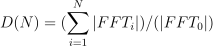
Parameters:
window_size:int- The size of the window to use for feature computation.
overlap:int- Determines the window overlapping; this number has to be between 0 (no overlapping) and ‘window-size’-1. Default: 0.
-
cluster_5quantities(arr, window_size, overlap)[source]¶ Calculates the clustered values as described at the paper: Counter- Measures to Photo Attacks in Face Recognition: a public database and a baseline, Anjos & Marcel, IJCB‘11.
This script will output a number of clustered observations containing the 5 described quantities for windows of a configurable size (N):
- The minimum value observed on the cluster
- The maximum value observed on the cluster
- The mean value observed
- The standard deviation on the cluster (unbiased estimator)
- The DC ratio (D) as defined by:
Note
We always ignore the first entry from the input array as, by definition, it is always zero.
Parameters:
arr: 1Dnumpy.ndarray- A 1D array containg frame differences.
window_size:int- The size of the window to use for feature computation.
overlap:int- Determines the window overlapping; this number has to be between 0 (no overlapping) and ‘window-size’-1.
Returns:
retval: 2Dnumpy.ndarray- Array of features without nan samples. Rows - samples, columns - features.
Here sample corresponds to features computed from the particular
window of the length
window_size.
-
comp_features(data, window_size, overlap)[source]¶ This function computes features for frame differences in the facial and non-facial regions.
Parameters:
data: 2Dnumpy.ndarray- An input array of frame differences in facial and non-facial regions. The first column contains frame differences of facial regions. The second column contains frame differences of non-facial/background regions.
window_size:int- The size of the window to use for feature computation.
overlap:int- Determines the window overlapping; this number has to be between 0 (no overlapping) and ‘window-size’-1. Default: 0.
Returns:
frames: FrameContainer- Features describing frame differences, stored in the FrameContainer.
-
convert_arr_to_frame_cont(data)[source]¶ This function converts an array of samples into a FrameContainer, where each frame stores features of a particular sample.
Parameters:
data: 2Dnumpy.ndarray- An input array of features of the size (Nr. of samples X Nr. of features).
Returns:
frames: FrameContainer- Resulting FrameContainer, where each frame stores features of a particular sample.
-
dcratio(arr)[source]¶ Calculates the DC ratio as defined by the following formula:
Parameters:
arr: 1Dnumpy.ndarray- A 1D array containg frame differences.
Returns:
dcratio:float- Calculated DC ratio.
-
read_feature(file_name)[source]¶ Reads the preprocessed data from file. This method overwrites the read_data() method of the Extractor class.
Parameters:
file_name:str- Name of the file.
Returns:
frames:bob.bio.video.FrameContainer- Frames stored in the frame container.
-
remove_nan_rows(data)[source]¶ This function removes rows of nan’s from the input array. If the input array contains nan’s only, then an array of ones of the size (1 x n_features) is returned.
Parameters:
data: 2Dnumpy.ndarray- An input array of features. Rows - samples, columns - features.
Returns:
ret_arr: 2Dnumpy.ndarray- Array of features without nan samples. Rows - samples, columns - features.
-
write_feature(frames, file_name)[source]¶ Writes the given data (that has been generated using the __call__ function of this class) to file. This method overwrites the write_data() method of the Extractor class.
Parameters:
frames:- Data returned by the __call__ method of the class.
file_name:str- Name of the file.
-
class
bob.pad.face.extractor.ImageQualityMeasure(galbally=True, msu=True, dtype=None, **kwargs)¶ Bases:
bob.bio.base.extractor.ExtractorThis class is designed to extract Image Quality Measures given input RGB image. For further documentation and description of features, see “bob.ip.qualitymeasure”.
Parameters:
-
class
bob.pad.face.extractor.LBPHistogram(lbptype='uniform', elbptype='regular', rad=1, neighbors=8, circ=False, dtype=None)¶ Bases:
bob.bio.base.extractor.ExtractorCalculates a normalized LBP histogram over an image. These features are implemented based on [CAM12].
Parameters: - lbptype (str) – The type of the LBP operator (regular, uniform or riu2)
- elbptype (str) – The type of extended version of LBP (regular if not extended version is used, otherwise transitional, direction_coded or modified)
- rad (float) – The radius of the circle on which the points are taken (for circular LBP)
- neighbors (int) – The number of points around the central point on which LBP is computed (4, 8, 16)
- circ (bool) – True if circular LBP is needed, False otherwise
-
dtype¶ numpy.dtype – If a
dtypeis specified in the contructor, it is assured that the resulting features have that dtype.
-
lbp¶ bob.ip.base.LBP – The LPB extractor object.
-
class
bob.pad.face.extractor.VideoDataLoader¶ Bases:
objectThis class is designed to load video data given name of the file. The class is called by corresponding extractors in the experiments using emty(!) preprocessor. In this scenario the video data is loaded directly from the database, avoiding duplicate storage of non-processed data in the experimental directory.
NOTE: To use this class in PAD experiments the command line argument
--preprocessed-directorymust point to the original database directory. For example: –preprocessed-directory <DIRECTORY_CONTAINING_REPLAY_ATTACK_DATABASE>At this point the class is just a collection of methods.
-
class
bob.pad.face.extractor.VideoLBPHistogram(lbptype='uniform', elbptype='regular', rad=1, neighbors=8, circ=False, dtype=None)¶ Bases:
bob.bio.base.extractor.Extractor,objectThis class is designed to extract LBP histograms for each frame in the input video sequence/container.
Parameters:
lbptype:str- The type of the LBP operator (“regular”, “uniform” or “riu2”). Default: uniform.
elbptype:str- The type of extended version of LBP (regular if not extended version is used, otherwise transitional, direction_coded or modified). Default: regular.
rad:float- The radius of the circle on which the points are taken (for circular LBP). Default: 1
neighbors:int- The number of points around the central point on which LBP is computed. Possible options: (4, 8, 16). Default: 8.
circ:bool- Set to True if circular LBP is needed. Default: False.
dtype: numpy.dtype- If specified in the constructor, the resulting features will have that type of data. Default: None.
-
read_feature(file_name)[source]¶ Reads the preprocessed data from file. This method overwrites the read_data() method of the Extractor class.
Parameters:
file_name:str- Name of the file.
Returns:
frames:bob.bio.video.FrameContainer- Frames stored in the frame container.
-
write_feature(frames, file_name)[source]¶ Writes the given data (that has been generated using the __call__ function of this class) to file. This method overwrites the write_data() method of the Extractor class.
Parameters:
frames:- Data returned by the __call__ method of the class.
file_name:str- Name of the file.
-
class
bob.pad.face.extractor.VideoQualityMeasure(galbally=True, msu=True, dtype=None, **kwargs)¶ Bases:
bob.bio.base.extractor.Extractor,objectThis class is designed to extract Quality Measures for each frame in the input color video. For further documentation and description of features, see “bob.ip.qualitymeasure”.
Parameters:
galbally:bool- If
True, galbally features will be added to the features. Default:True. msu:bool- If
True, MSU features will be added to the features. Default:True. dtype: numpy.dtype- The data type of the resulting feature vector.
Default:
None.
-
read_feature(file_name)[source]¶ Reads the preprocessed data from file. This method overwrites the read_data() method of the Extractor class.
Parameters:
file_name:str- Name of the file.
Returns:
frames:bob.bio.video.FrameContainer- Frames stored in the frame container.
-
write_feature(frames, file_name)[source]¶ Writes the given data (that has been generated using the __call__ function of this class) to file. This method overwrites the write_data() method of the Extractor class.
Parameters:
frames:- Data returned by the __call__ method of the class.
file_name:str- Name of the file.
Matching Algorithms
-
class
bob.pad.face.algorithm.VideoSvmPadAlgorithm(machine_type='C_SVC', kernel_type='RBF', n_samples=10000, trainer_grid_search_params={'cost': [0.03125, 0.125, 0.5, 2, 8, 32, 128, 512, 2048, 8192, 32768], 'gamma': [3.0517578125e-05, 0.0001220703125, 0.00048828125, 0.001953125, 0.0078125, 0.03125, 0.125, 0.5, 2, 8]}, mean_std_norm_flag=False, frame_level_scores_flag=False, save_debug_data_flag=True, reduced_train_data_flag=False, n_train_samples=50000)¶ Bases:
bob.pad.base.algorithm.AlgorithmThis class is designed to train SVM given Frame Containers with features of real and attack classes. The trained SVM is then used to classify the testing data as either real or attack. The SVM is trained in two stages. First, the best parameters for SVM are estimated using train and cross-validation subsets. The size of the subsets used in hyper-parameter tuning is defined by
n_samplesparameter of this class. Once best parameters are determined, the SVM machine is trained using complete training set.Parameters:
machine_type:str- A type of the SVM machine. Please check
bob.learn.libsvmfor more details. Default: ‘C_SVC’. kernel_type:str- A type of kerenel for the SVM machine. Please check
bob.learn.libsvmfor more details. Default: ‘RBF’. n_samples:int- Number of uniformly selected feature vectors per class defining the sizes of sub-sets used in the hyper-parameter grid search.
trainer_grid_search_params:dict- Dictionary containing the hyper-parameters of the SVM to be tested in the grid-search. Default: {‘cost’: [2**p for p in range(-5, 16, 2)], ‘gamma’: [2**p for p in range(-15, 4, 2)]}.
mean_std_norm_flag:bool- Perform mean-std normalization of data if set to True. Default: False.
frame_level_scores_flag:bool- Return scores for each frame individually if True. Otherwise, return a single score per video. Default: False.
save_debug_data_flag:bool- Save the data, which might be usefull for debugging if
True. Default:True. reduced_train_data_flag:bool- Reduce the amount of final training samples if set to
True. Default:False. n_train_samples:int- Number of uniformly selected feature vectors per class defining the sizes of sub-sets used in the final traing of the SVM. Default: 50000.
-
combinations(input_dict)[source]¶ Obtain all possible key-value combinations in the input dictionary containing list values.
Parameters:
input_dict:dict- Input dictionary with list values.
Returns:
combinations: [dict]- A list of dictionaries containing the combinations.
-
comp_prediction_precision(machine, real, attack)[source]¶ This function computes the precision of the predictions as a ratio of correctly classified samples to the total number of samples.
Parameters:
machine: object- A pre-trained SVM machine.
real: 2Dnumpy.ndarray- Array of features representing the real class.
attack: 2Dnumpy.ndarray- Array of features representing the attack class.
Returns:
precision:float- The precision of the predictions.
-
convert_frame_cont_to_array(frame_container)[source]¶ This function converts a single Frame Container into an array of features. The rows are samples, the columns are features.
Parameters:
frame_container: object- A Frame Container conteining the features of an individual,
see
bob.bio.video.utils.FrameContainer.
Returns:
features_array: 2Dnumpy.ndarray- An array containing features for all frames. The rows are samples, the columns are features.
-
convert_list_of_frame_cont_to_array(frame_containers)[source]¶ This function converts a list of Frame containers into an array of features. Features from different frame containers (individuals) are concatenated into the same list. This list is then converted to an array. The rows are samples, the columns are features.
Parameters:
frame_containers: [FrameContainer]- A list of Frame Containers, , see
bob.bio.video.utils.FrameContainer. Each frame Container contains feature vectors for the particular individual/person.
Returns:
features_array: 2Dnumpy.ndarray- An array containing features for all frames of all individuals.
-
load_projector(projector_file)[source]¶ Load the pretrained projector/SVM from file to perform a feature projection. This function usually is useful in combination with the
train_projector()function.Please register performs_projection = True in the constructor to enable this function.
Parameters:
projector_file:str- The file to read the projector from.
-
mean_std_normalize(features, features_mean=None, features_std=None)[source]¶ The features in the input 2D array are mean-std normalized. The rows are samples, the columns are features. If
features_meanandfeatures_stdare provided, then these vectors will be used for normalization. Otherwise, the mean and std of the features is computed on the fly.Parameters:
features: 2Dnumpy.ndarray- Array of features to be normalized.
features_mean: 1Dnumpy.ndarray- Mean of the features. Default: None.
features_std: 2Dnumpy.ndarray- Standart deviation of the features. Default: None.
Returns:
features_norm: 2Dnumpy.ndarray- Normalized array of features.
features_mean: 1Dnumpy.ndarray- Mean of the features.
features_std: 2Dnumpy.ndarray- Standart deviation of the features.
-
norm_train_cv_data(real_train, real_cv, attack_train, attack_cv)[source]¶ Mean-std normalization of train and cross-validation data arrays.
Parameters:
real_train: 2Dnumpy.ndarray- Subset of train features for the real class.
real_cv: 2Dnumpy.ndarray- Subset of cross-validation features for the real class.
attack_train: 2Dnumpy.ndarray- Subset of train features for the attack class.
attack_cv: 2Dnumpy.ndarray- Subset of cross-validation features for the attack class.
Returns:
real_train_norm: 2Dnumpy.ndarray- Normalized subset of train features for the real class.
real_cv_norm: 2Dnumpy.ndarray- Normalized subset of cross-validation features for the real class.
attack_train_norm: 2Dnumpy.ndarray- Normalized subset of train features for the attack class.
attack_cv_norm: 2Dnumpy.ndarray- Normalized subset of cross-validation features for the attack class.
-
p= 3
-
prepare_data_for_hyper_param_grid_search(training_features, n_samples)[source]¶ This function converts a list of all training features returned by
read_featuresmethod of the extractor to the subsampled train and cross-validation arrays for both real and attack classes.Parameters:
training_features: [[FrameContainer], [FrameContainer]]- A list containing two elements: [0] - a list of Frame Containers with feature vectors for the real class; [1] - a list of Frame Containers with feature vectors for the attack class.
n_samples:int- Number of uniformly selected feature vectors per class.
Returns:
real_train: 2Dnumpy.ndarray- Selected subset of train features for the real class. The number of samples in this set is n_samples/2, which is defined by split_data_to_train_cv method of this class.
real_cv: 2Dnumpy.ndarray- Selected subset of cross-validation features for the real class. The number of samples in this set is n_samples/2, which is defined by split_data_to_train_cv method of this class.
attack_train: 2Dnumpy.ndarray- Selected subset of train features for the attack class. The number of samples in this set is n_samples/2, which is defined by split_data_to_train_cv method of this class.
attack_cv: 2Dnumpy.ndarray- Selected subset of cross-validation features for the attack class. The number of samples in this set is n_samples/2, which is defined by split_data_to_train_cv method of this class.
-
project(feature)[source]¶ This function computes class probabilities for the input feature using pretrained SVM. The feature in this case is a Frame Container with features for each frame. The probabilities will be computed and returned for each frame.
Set
performs_projection = Truein the constructor to enable this function. It is assured that theload_projector()was called before theprojectfunction is executed.Parameters:
feature: object- A Frame Container conteining the features of an individual,
see
bob.bio.video.utils.FrameContainer.
Returns:
probabilities: 2Dnumpy.ndarray- An array containing class probabilities for each frame.
First column contains probabilities for each frame being a real class.
Second column contains probabilities for each frame being an attack class.
Must be writable with the
write_featurefunction and readable with theread_featurefunction.
-
score(toscore)[source]¶ Returns a probability of a sample being a real class.
Parameters:
toscore: 2Dnumpy.ndarray- An array containing class probabilities for each frame. First column contains probabilities for each frame being a real class. Second column contains probabilities for each frame being an attack class.
Returns:
score:float- or a list of scores containing individual score for each frame.
A score value for the object
toscore. A probability of a sample being a real class.
-
score_for_multiple_projections(toscore)[source]¶ Returns a list of scores computed by the score method of this class.
Parameters:
toscore: 2Dnumpy.ndarray- An array containing scores computed by score() method of this class.
Returns:
list_of_scores: [float]- A list containing the scores.
-
select_quasi_uniform_data_subset(features, n_samples)[source]¶ Select quasi uniformly N samples/feature vectors from the input array of samples. The rows in the input array are samples. The columns are features. Use this function if n_samples is close to the number of samples.
Parameters:
features: 2Dnumpy.ndarray- Input array with feature vectors. The rows are samples, columns are features.
n_samples:int- The number of samples to be selected uniformly from the input array of features.
Returns:
features_subset: 2Dnumpy.ndarray- Selected subset of features.
-
select_uniform_data_subset(features, n_samples)[source]¶ Uniformly select N samples/feature vectors from the input array of samples. The rows in the input array are samples. The columns are features.
Parameters:
features: 2Dnumpy.ndarray- Input array with feature vectors. The rows are samples, columns are features.
n_samples:int- The number of samples to be selected uniformly from the input array of features.
Returns:
features_subset: 2Dnumpy.ndarray- Selected subset of features.
-
split_data_to_train_cv(features)[source]¶ This function is designed to split the input array of features into two subset namely train and cross-validation. These subsets can be used to tune the hyper-parameters of the SVM. The splitting is 50/50, the first half of the samples in the input are selected to be train set, and the second half of samples is cross-validation.
Parameters:
features: 2Dnumpy.ndarray- Input array with feature vectors. The rows are samples, columns are features.
Returns:
features_train: 2Dnumpy.ndarray- Selected subset of train features.
features_cv: 2Dnumpy.ndarray- Selected subset of cross-validation features.
-
train_projector(training_features, projector_file)[source]¶ Train SVM feature projector and save the trained SVM to a given file. The
requires_projector_training = Trueflag must be set to True to enable this function.Parameters:
training_features: [[FrameContainer], [FrameContainer]]- A list containing two elements: [0] - a list of Frame Containers with feature vectors for the real class; [1] - a list of Frame Containers with feature vectors for the attack class.
projector_file:str- The file to save the trained projector to.
This file should be readable with the
load_projector()function.
-
train_svm(training_features, n_samples=10000, machine_type='C_SVC', kernel_type='RBF', trainer_grid_search_params={'cost': [0.03125, 0.125, 0.5, 2, 8, 32, 128, 512, 2048, 8192, 32768], 'gamma': [3.0517578125e-05, 0.0001220703125, 0.00048828125, 0.001953125, 0.0078125, 0.03125, 0.125, 0.5, 2, 8]}, mean_std_norm_flag=False, projector_file='', save_debug_data_flag=True, reduced_train_data_flag=False, n_train_samples=50000)[source]¶ First, this function tunes the hyper-parameters of the SVM classifier using grid search on the sub-sets of training data. Train and cross-validation subsets for both classes are formed from the available input training_features.
Once successfull parameters are determined the SVM is trained on the whole training data set. The resulting machine is returned by the function.
Parameters:
training_features: [[FrameContainer], [FrameContainer]]- A list containing two elements: [0] - a list of Frame Containers with feature vectors for the real class; [1] - a list of Frame Containers with feature vectors for the attack class.
n_samples:int- Number of uniformly selected feature vectors per class defining the sizes of sub-sets used in the hyper-parameter grid search.
machine_type:str- A type of the SVM machine. Please check
bob.learn.libsvmfor more details. kernel_type:str- A type of kerenel for the SVM machine. Please check
bob.learn.libsvmfor more details. trainer_grid_search_params:dict- Dictionary containing the hyper-parameters of the SVM to be tested in the grid-search.
mean_std_norm_flag:bool- Perform mean-std normalization of data if set to True. Default: False.
projector_file:str- The name of the file to save the trained projector to. Only the path of this file is used in this function. The file debug_data.hdf5 will be save in this path. This file contains information, which might be usefull for debugging.
save_debug_data_flag:bool- Save the data, which might be usefull for debugging if
True. Default:True. reduced_train_data_flag:bool- Reduce the amount of final training samples if set to
True. Default:False. n_train_samples:int- Number of uniformly selected feature vectors per class defining the sizes of sub-sets used in the final traing of the SVM. Default: 50000.
Returns:
machine: object- A trained SVM machine.